Now playing · Alpha · PC · Android · TV
Your whole
Your whole
library,one guide.
A private media hub, totally yours. Your files, your channels and your recordings — unified on your own machine, and on every screen in the house. No account, no cloud, no subscription.
Guide
8:008:309:009:30
01Quvito
LiveQuick Video, Totally YoursYour entire library, one place
02Live TV
DVR & series rulesAuto-record every airing
EPG guide
03Multiview
One connectionUp to 4 views at onceDad's game, mom's series, kids' movie — one connection
Spoiler-safe replays
04Movies & Series
Any sourceLocal files, downloads & add-onsCommercial-skip · skip-intro · auto-play next
05Music
Gapless · gain-matched · visualized
Radio & podcasts, built in
Sources
Xtream · M3U · Stalker · Files
Runs on
PC · Android · TV
Soon: Mac · iOS · tvOS
Account
None required
Price
Free for now
This is an early alpha — and it's all free right now. PC, Android and TV, every feature, free until further notice. Quvito ships with no channels or content — you connect your own legally-authorized source (Xtream, M3U, a Stalker portal, or your own files). Rough edges expected; your feedback shapes it.
How it works
Streaming in four steps
No account, no cloud sign-up. Install it on the machine your media lives on, and point it at what you already have.
Step 01
Install Quvito
One download for your PC. It installs for your user only — no admin rights, no account to create.
Step 02
Connect your source
Point it at a folder of your own files — and paste in your TV subscription's Xtream login, M3U playlist or Stalker portal if you have one.
Step 03
It builds your guide
Quvito merges everything into one library, matches artwork and episode data, and fills in a real EPG.
Step 04
Watch anywhere at home
Add the free Android & TV apps and they share the same library, favorites and Continue Watching.
The tour
One app. Everything you watch.
Live TV, movies, series and music — from your own files, from Xtream, M3U and Stalker sources, and from add-ons — in one place, on your own machine.
Every source
One library,
One library,
not five apps
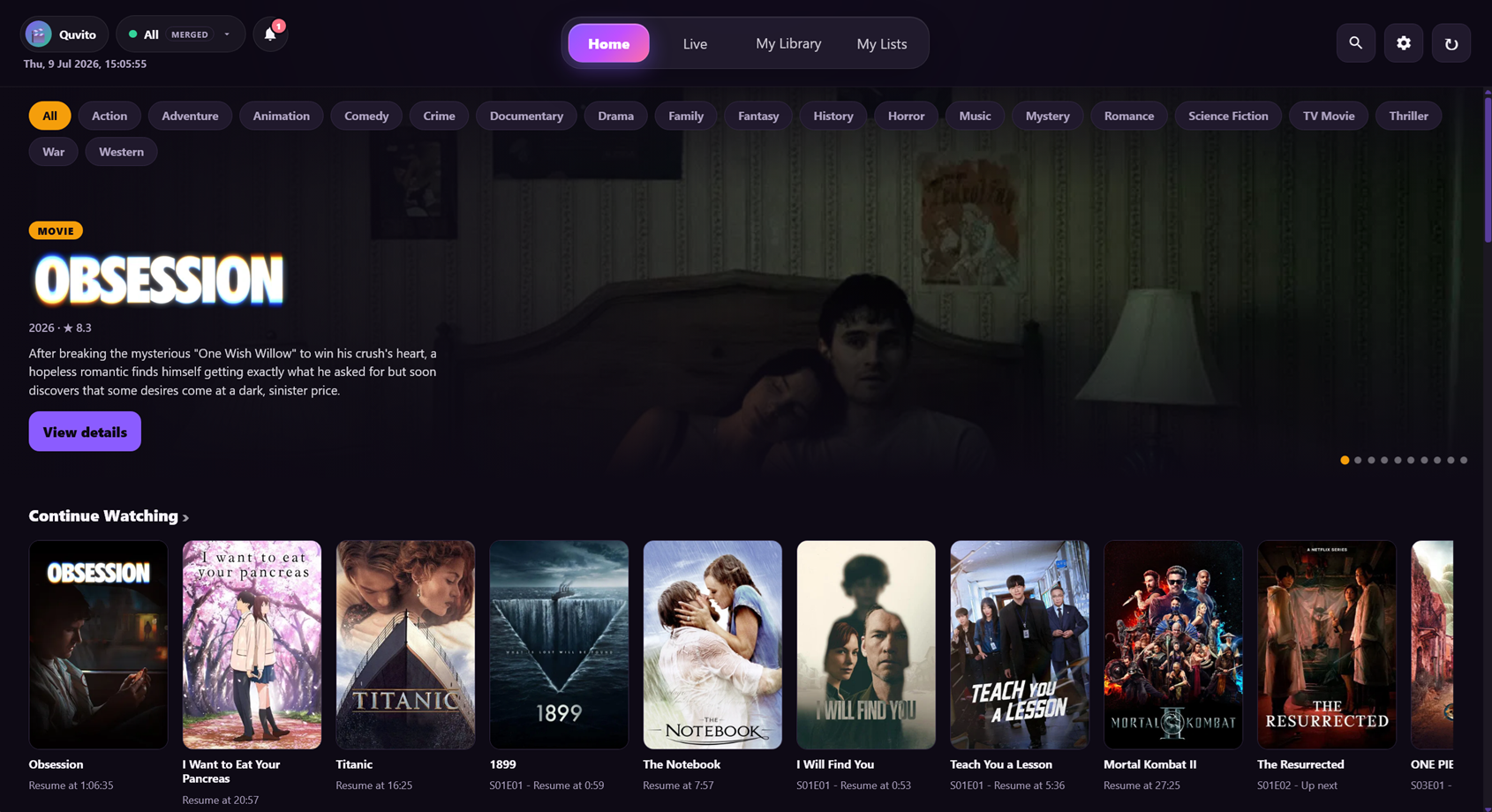
Xtream, M3U, Stalker portals, local folders and Stremio add-ons all merge into a single searchable library. Quvito works out what is a movie, what is a series, and which episode you are on.
- Posters, ratings, cast and episode data filled in automatically
- Continue Watching that follows you across every device
- Duplicate titles across providers collapse into one entry
Live TV
A guide that
A guide that
actually works
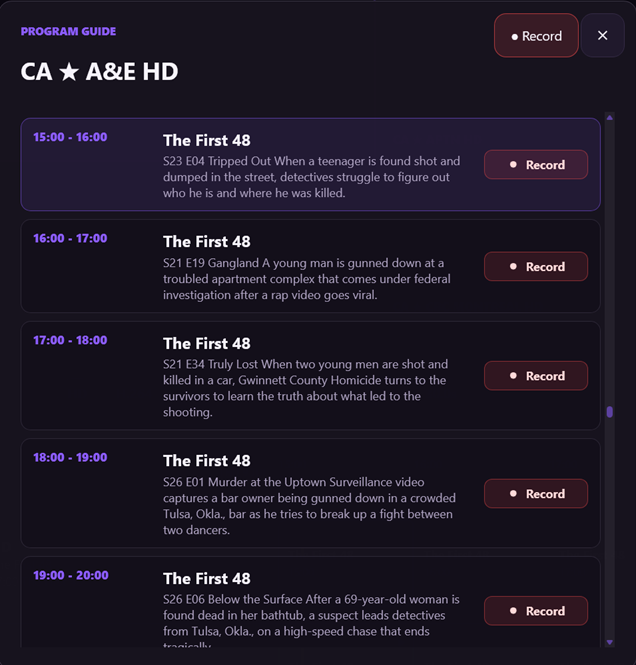
A real EPG for your channels, with community and custom XMLTV sources merged in — so the grid is filled in even when your provider's own data is thin.
- Catch-up and replay on providers that support it
- Recent channels and favorites, synced across your devices
- Per-country matching that fixes mislabelled channels
DVR
Record it once,
Record it once,
catch every airing
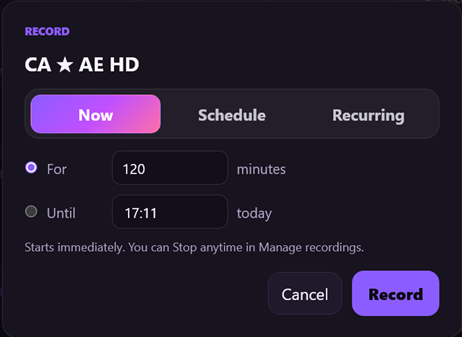
Record straight from the guide, or set a series rule and let Quvito catch every episode — de-duplicated, named properly, and dropped into your library beside everything else.
- Series rules with automatic episode de-duplication
- Commercial-skip on recordings, and skip-intro on series
- Recordings play back on your phone and TV too
One connection
Four screens,
Four screens,
one subscription slot
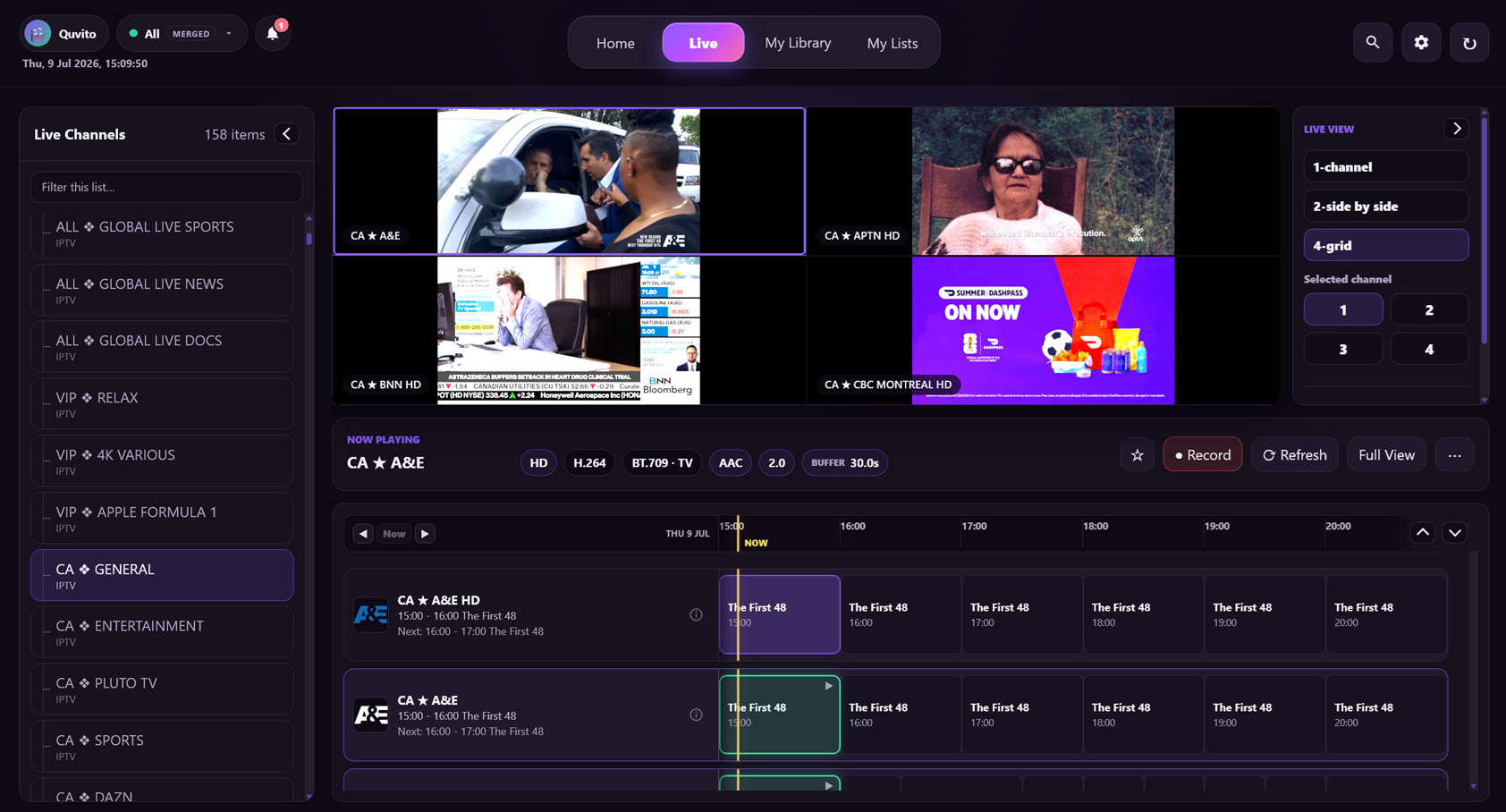
Watch up to four live channels at once — or spread them across the house. Quvito's server pulls each stream a single time and shares your one provider connection across every screen, so you do not need a subscription slot per device.
- Dad's match on the TV, mom's series on a tablet, the kids' movie on another
- Saved multiview presets for the games you always watch together
- Your home internet speed is the real limit, not your provider's seat count
The player
Built for the
Built for the
big screen
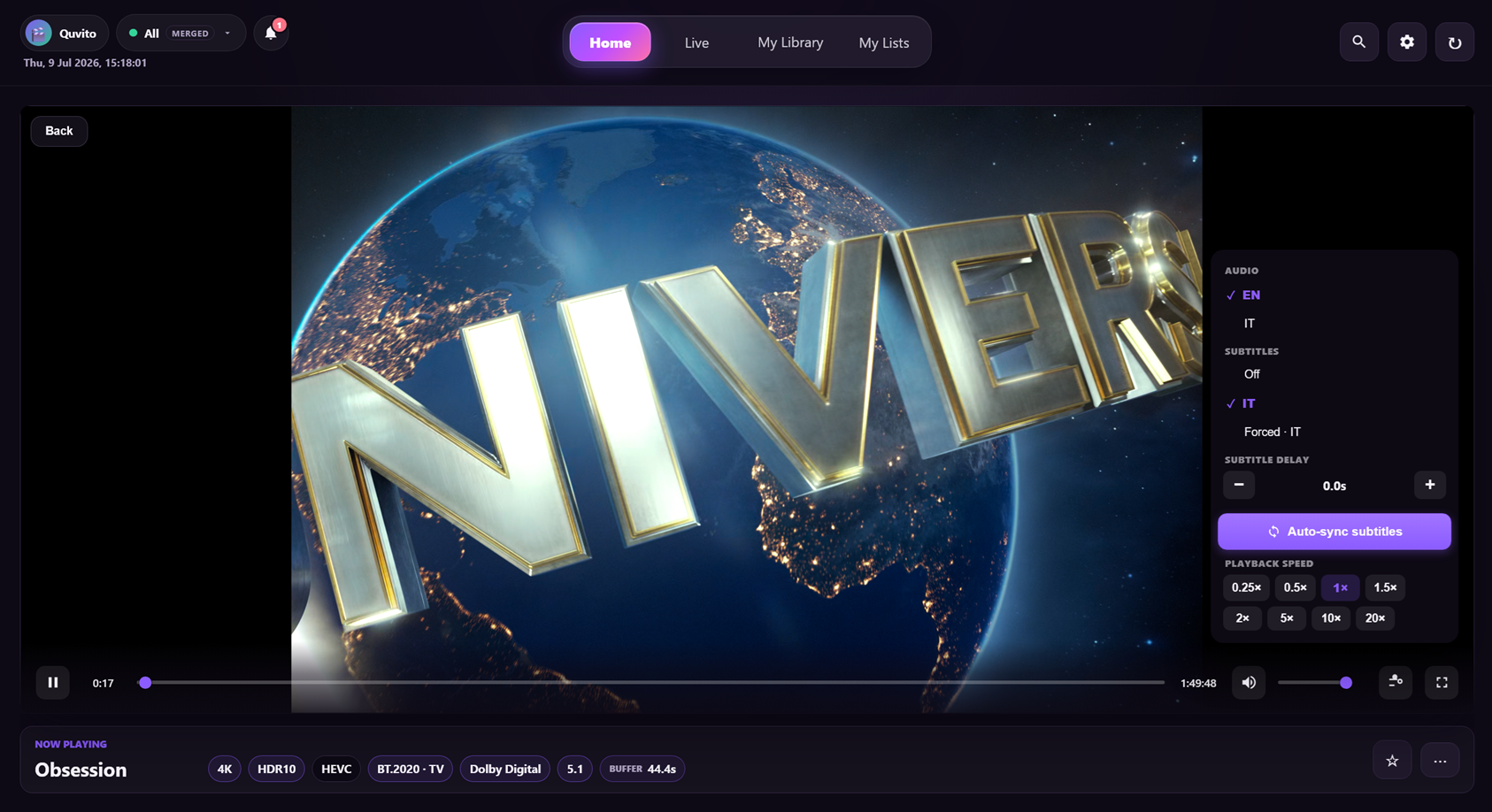
A native player with the things you actually reach for — subtitles that line up, audio track switching, auto-play next with a countdown, and a second-screen remote in your pocket.
- Auto-synced subtitles, with your own OpenSubtitles key for extra languages
- Fling a title or channel to the TV from your phone
- Family profiles, and kids profiles with a PIN and allowed hours
Music
A real music
A real music
player, included
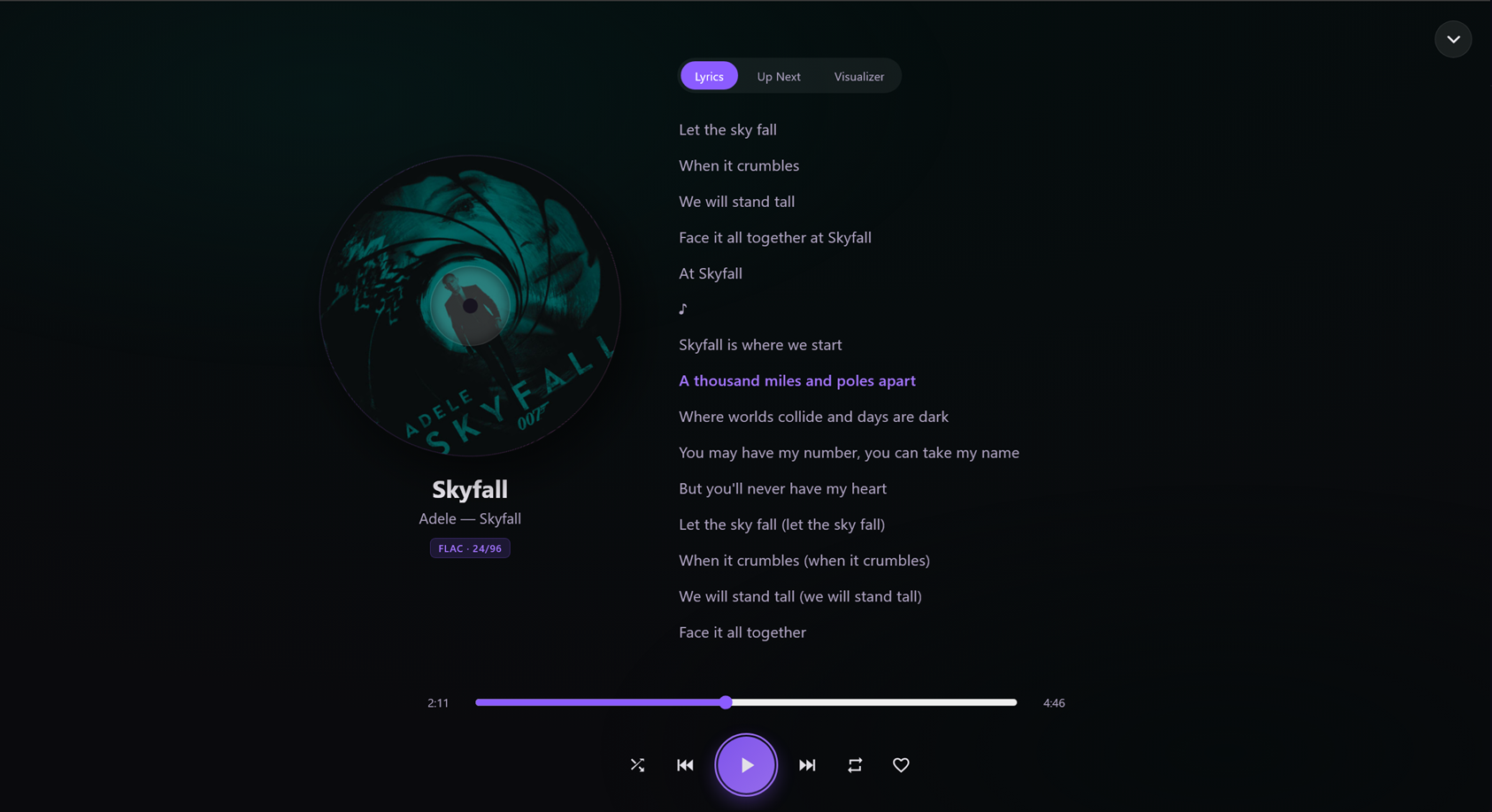
Not an afterthought tab. Gapless crossfade, ReplayGain leveling, a graphic EQ, bit-perfect output, synced lyrics and a live visualizer — for your own files.
- Built-in internet radio and podcasts, with no setup at all
- Scrobbles to Last.fm, per profile
- Playback follows you between the desktop, phone and TV
Artwork & data
Your files,
Your files,
dressed properly
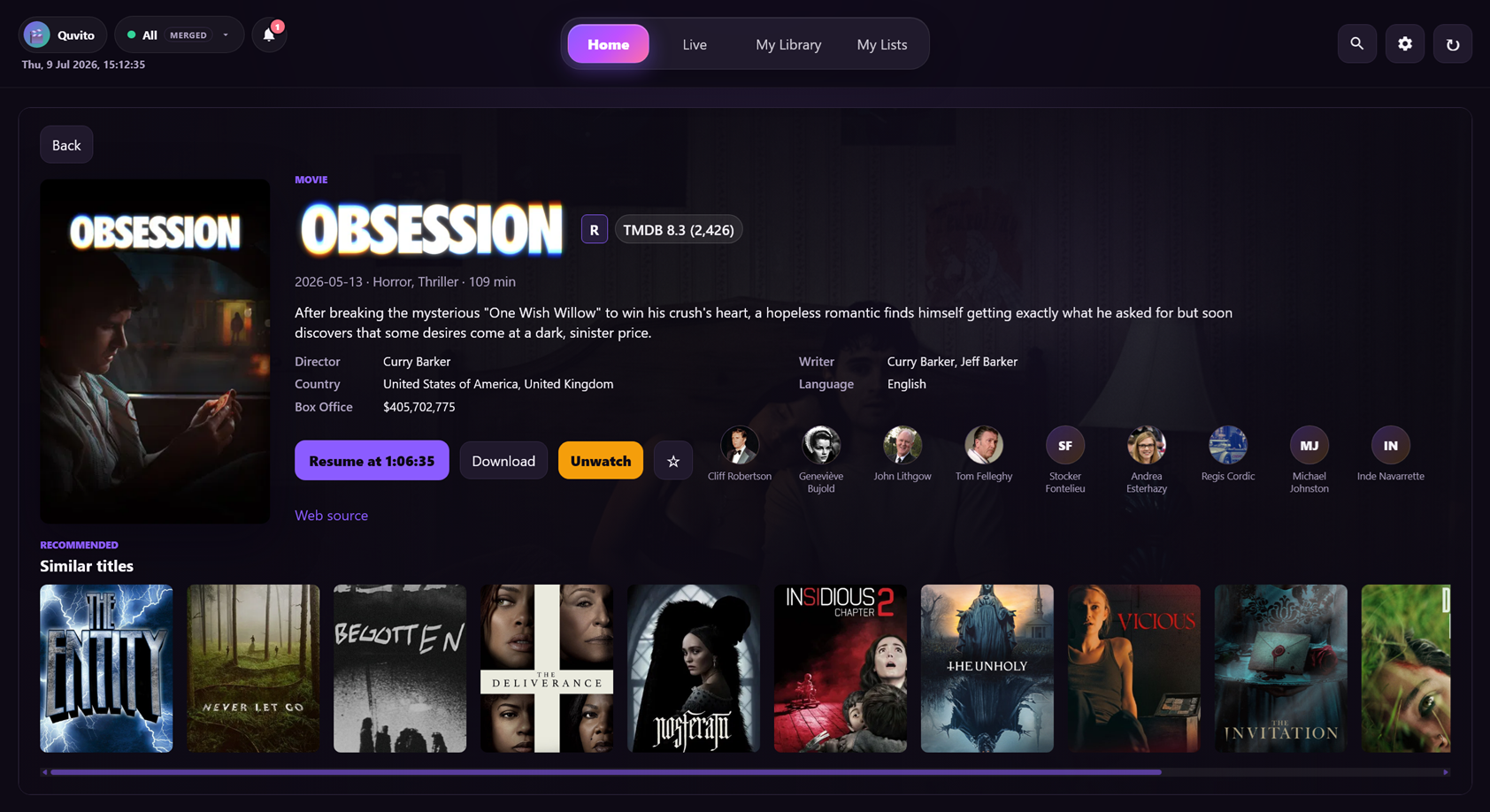
Point Quvito at a folder of loose files and it comes back with posters, backdrops, ratings, cast lists, season and episode details — the same treatment your provider's catalogue gets.
- Artwork, episode data and discovery rows work out of the box — no API key to sign up for
- Messy filenames matched to the right title and episode
- The same detail page whether a title came from a provider, a folder or an add-on
Why Quvito
No account. No cloud. No subscription.
Quvito runs on your machine and talks to your sources. That is the whole design, and everything below follows from it.
| Quvito | What usually happens | |
|---|---|---|
| Getting started | Install, paste a source, done | Make an account before you can watch your own files |
| Where your library lives | On your machine, always | Indexed by somebody else's cloud |
| Watching at home | Free, every feature | Increasingly behind a pass |
| IPTV sources | Xtream, M3U and Stalker, first-class | Playlist support bolted on, or none at all |
| Local files and IPTV together | One merged library | Two different apps |
| Several screens at once | One connection, shared | One subscription slot per device |
| The desktop app | Free forever | The thing that eventually gets paywalled |
The lineup
Everything else it does
The full set of what Quvito does — the same library on your PC, phone and TV. Bring your sources, it does the rest.
01
One unified libraryXtream, M3U, Stalker portals, local folders and Stremio add-ons — merged and searchable. Movies & Series play from your provider, local files, downloads or add-ons
02
DVR & series rulesRecord from the guide or by timer; auto-catch every airing, de-dupe episodes
03
Commercial-skip, skip-intro & auto-play nextSkip ad breaks on recordings, learn a show's intro once and skip it every time, then roll straight into the next episode with a countdown
04
Multiview — the whole house, one connectionWatch up to four live channels side by side on one screen — or spread them across the family: dad's match on the TV, mom's series on a tablet, the kids' movie on another, all at once. Quvito's server pulls each stream once and shares your single provider connection (or add-on stream) across every screen, so you don't need a subscription slot per device the way most apps do. Your home internet speed is the real limit. Saved presets and spoiler-safe recordings included
05
Subtitles that fitAuto-synced subtitles in your languages. Add your own OMDb or OpenSubtitles key for rating chips and a wider subtitle catalogue — artwork and metadata need no key at all
06
Music, radio & podcastsA full player for your own files — gapless crossfade, ReplayGain leveling, graphic EQ, bit-perfect output, lyrics and a live visualizer — plus built-in internet radio and podcasts, no setup
07
Family profilesA profile for everyone; kids profiles with a PIN, time limits and allowed hours
08
Trakt & Last.fm scrobblingMovies & Series scrobble to your Trakt.tv history; music scrobbles to Last.fm — automatically, per profile
09
On your phone & TVNative Android & Android TV apps that share the same library, favorites and history — plus a built-in second-screen remote to fling a title or channel to another screen, or drive playback from your phoneSoon: iPhone & Apple TV apps, paired the same way
10
Private by designRuns on your own devices — no Quvito account, no cloud, your data stays yours
Coming soon
On the roadmap
PC, Android and Android TV are here today. Still tuning the next channels:
—
Out-of-home access SoonReach your library away from home over a secure tunnel — no router setup — or self-host it your own way
—
iPhone & Apple TV apps SoonNative Quvito on iOS and tvOS, paired to your library like the Android apps
—
Standalone NAS serverRun Quvito's server on your NAS (Docker / Synology) — no PC needed
—
Mac app SoonA native Mac build — pair it to your PC, or let it host the library itself
—
Linux appNative desktop build beyond Windows and Mac
—
Watch & listen togetherSynced playback across devices, in perfect time
Tune in.
Free for everyone while we're in alpha — PC, Android and TV. Bring your own source, no account.